How to Build a Family Emergency Plan for Remote Workers

Last Updated: November 2, 2026
Quick Summary
A family emergency plan for remote workers is a household disaster plan that also protects your income by covering power, internet, devices, and work access alongside evacuation and supplies. Build it by naming your top three local hazards, writing a one-page plan with contacts, meeting points, and roles, then adding a work layer for employer notification and a work backup.
- Text messages often get through when voice calls fail, so make texting your default and voice your backup.
- Set check-in windows at fixed times, such as 8 a.m. and 8 p.m., so silence has a meaning.
- Assign roles in writing, including a plan lead, comms lead, kids lead, and work backup.
- Aim for a three-day supply of emergency supplies first, then extend to two weeks as space and budget allow.
- Run one short drill every six months and fix one gap per quarter.
Table of Contents
- Why a Family Emergency Plan for Remote Workers Needs a Work Continuity Layer
- Start With Local Hazards and a Household Emergency Plan
- Build a Family Emergency Communication Plan That Survives a Dead Network
- Use a Family Disaster Plan Template to Assign Roles and Meeting Points
- Draft a Family Evacuation Plan With Routes, Exits, and Shelter-in-Place Triggers
- Power Outage Preparedness for Remote Workers: Power, Internet, and Devices
- Stock Emergency Supplies That Fit an Apartment and a Budget
- Run a Drill, Review the Plan, and Fix the Gaps
- Frequently Asked Questions
Why a Family Emergency Plan for Remote Workers Needs a Work Continuity Layer
A family emergency plan for remote workers is a household disaster plan that also protects your income: it covers power, internet, devices, and work access alongside evacuation and supplies.
The gap is wide. A 2026 survey snapshot from United Way's preparedness survey found that 84% of respondents have not created or tested a household emergency plan.
Those numbers describe households in general. Remote workers carry extra risk on top.
The Preparedness Gap Most Households Share
Preparedness gaps usually aren't laziness. They're structural. A plan lives in someone's head, never gets written down, and never gets tested. Research on household emergency planning among Americans has examined what makes families more or less likely to write a plan at all, and the pattern is consistent: intention without a written artifact fades fast.
Watch out: the most common mistake is treating "we'd figure it out" as a plan. It isn't. Under stress, people default to habit, and habit assumes a working phone and a working router.
What Changes When Your Home Is Also Your Office
Your home is now two things at once: a shelter and a workplace. That overlap creates risks a standard household plan ignores.
- One outage hits twice. No power means no shelter and no paycheck.
- Your devices are shared. The laptop your kids use for school may be the one you need for work.
- Your employer expects continuity. NOAA's guidance on remote-work disruptions tells readers to make and practice a family emergency plan, and remote-work guidance from Atera's remote worker planning notes describes planning supplies and continuing work during and after an emergency.
Below, we'll show you exactly how to build a plan that covers both. Each step takes minutes, not weekends.
Start With Local Hazards and a Household Emergency Plan
Start by naming the hazards your household actually faces, then write a one-page household emergency plan around them.
Work through these steps:
- List your top three local hazards. Think severe weather, flooding, wildfire smoke, earthquakes, or extended outages.
- Check your local emergency management office. They publish hazard maps and alert sign-up pages.
- Write one page. Contacts, meeting points, roles, and supplies go on it.
- Post it where everyone sees it. The fridge works.
- Set a review date. Twice a year is enough.
If you want the full walkthrough, our guide on how to build a family disaster plan that works covers each step in detail.
Then add the work layer: who covers your shift if you can't log on, and how your employer reaches you.
Build a Family Emergency Communication Plan That Survives a Dead Network
A family emergency communication plan is a written set of contacts, check-in windows, and backup methods that works when calls fail. If you want a ready-made structure, use a PACE template to build the contacts, check-in windows, and backup methods described here. For a remote worker, it also has to answer a second question: who tells your employer, and who covers your work, when you can't log on?
Text messages often get through when voice calls don't, so make texting your default and voice your backup. But don't stop at the family layer. Build three layers into one page:
- Household layer: who checks on whom, and in what order.
- Extended-family layer: the out-of-area contact who relays messages between households.
- Work layer: your manager, your designated work backup, and the exact wording of the message they should send on your behalf.
Household and Out-of-Area Contacts
Pick your out-of-area contact before you need them, and ask first. Then give that person the authority to relay messages between family members. Keep a paper copy of every number.
Set check-in windows at fixed times, 8 a.m. and 8 p.m. work for most households, so silence has a meaning. A missed window triggers the next step: the out-of-area contact calls the household, then the work backup.
The Remote-Worker Layer: Employer Notification and Work Backup
Most employers have an emergency call-off or status-reporting procedure, but few remote workers know it by heart. Write it down before you need it:
- Manager contact: name, direct number, and a secondary channel (email or team chat) in case the primary fails.
- Work backup: one colleague who knows where your active files live and can send a short status message to your team.
- Pre-written message: a two-sentence template, "This is [name]'s emergency contact. [Name] is safe but offline due to [event]. They will check in when connectivity returns." Store it in your phone notes and on the paper card.
- Expected-response window: tell your backup how long to wait before escalating to your manager.
Backup Methods and the Paper Card
Layer your methods so a single failure doesn't cut you off:
- SMS first. Short texts queue and retry; voice calls need a live circuit.
- A group chat (Signal, WhatsApp, or your family's preferred app) for the household.
- Email as a slow but reliable fallback.
Use a Family Disaster Plan Template to Assign Roles and Meeting Points
A family disaster plan template works because it forces decisions before the pressure hits. Roles are the part most families skip, and they're the part that matters most when the remote worker is unreachable.
Assign these roles in writing:
- Plan lead: grabs the go-bag and the document folder.
- Comms lead: sends the first check-in message.
- Kids lead: keeps children and pets together.
Then set two meeting points:
| Meeting Point | Where | When to Use |
|---|---|---|
| Near home | A landmark at the end of your street | House fire or quick evacuation |
| Out of area | A relative's home or community center two towns over | Neighborhood-wide evacuation |
Every household member should be able to name both from memory. Test that at dinner this week.
Draft a Family Evacuation Plan With Routes, Exits, and Shelter-in-Place Triggers
A family evacuation plan needs two exits from every room, one primary route out of the neighborhood, and one backup route. Draw it on paper. Walk it once in daylight and once after dark.
Then decide your shelter-in-place triggers in advance:
- Severe weather or tornado warning: interior room, lowest floor, no windows.
- Smoke or outside contamination: sealed room, vents closed, damp towel at the door.
- Civil or security incident: stay put, lock up, monitor alerts.
Your shelter room depends on the hazard. For concrete guidance on choosing and setting up a room for each hazard, see shelter-in-place room setup by hazard.
Watch out: don't pick one "safe room" for every scenario. That single choice is the most common evacuation-plan error we see.
Power Outage Preparedness for Remote Workers: Power, Internet, and Devices
Power outage preparedness for remote workers comes down to three backups: power, internet, and device access. Build all three, because an outage rarely takes just one. The goal isn't to keep working through a disaster, it's to keep your income intact while your household stays safe.
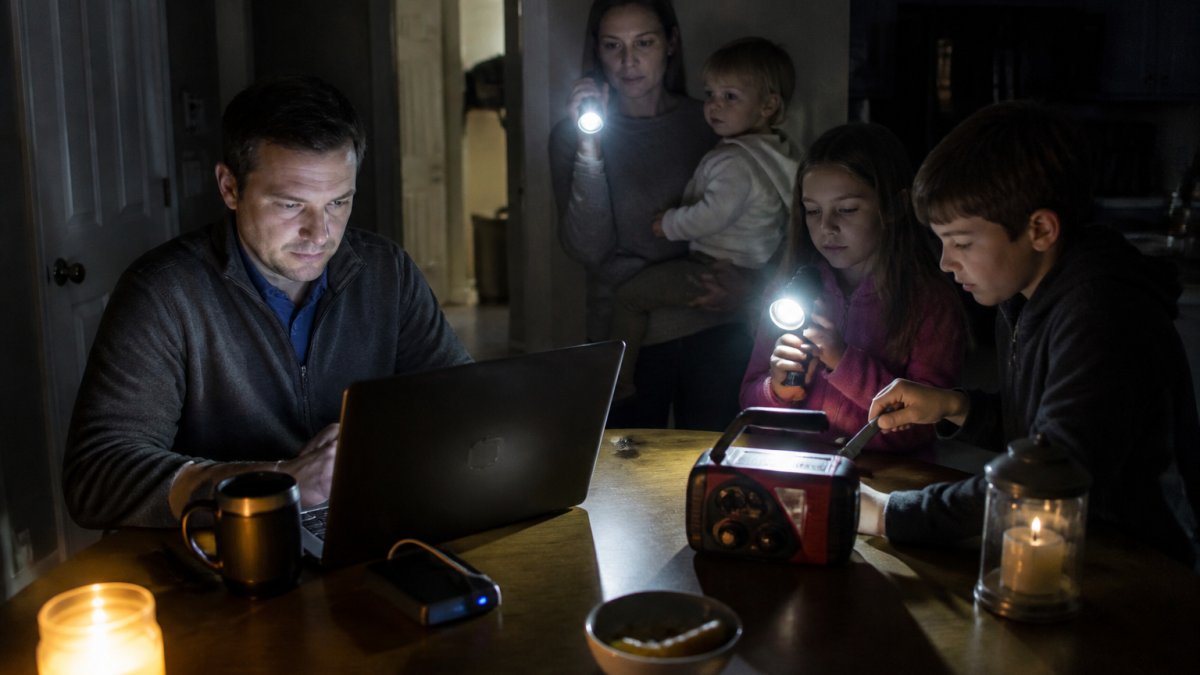
Power: Size the Battery to the Job
A battery bank that charges a phone is not the same as one that runs a laptop. Check your laptop's watt-hour rating (often printed on the charger) and buy a bank rated above it. A battery bank's runtime depends on its capacity and your laptop's power draw, so check the rating against your device before relying on it.
- A battery bank sized to charge your laptop at least once
- A phone power bank, charged weekly
- A hand-crank or battery-powered radio for alerts
Internet: Plan for the Network, Not Just the Router
Your phone's hotspot is the default backup, but it depends on the same cell network everyone else is using. During a regional outage, towers congest. Plan two layers:
- Primary backup: your phone hotspot, tested monthly.
- Secondary backup: a second carrier on a different network (a prepaid SIM is cheap insurance), or a known alternate location with working internet, a library, a relative's home, or a coworking space outside the affected area.
Decide in advance which work tasks can wait and which can't. A short list, "send status update, save files, notify manager", is more useful than a full workday plan.
Devices and Data: Access Without the Cloud
When the internet is down, cloud files are gone. Keep offline copies of the documents you'd need to prove who you are and what you're covered for:
- A password manager with an offline mode, plus recovery codes printed and stored offline
- Downloaded copies of insurance, ID, and medical records
- A printed list of account recovery codes and key contacts
Confirm your employer's remote access works from a phone and from a hotspot, test it before you need it. If your company requires a VPN token or hardware key, keep it with your go-bag, not on your desk.
Renters without generator access can cover most of this cheaply.
Stock Emergency Supplies That Fit an Apartment and a Budget
Emergency supplies don't need a garage. They need a shelf, a closet floor, and a plan. Aim for a three-day supply first, then extend to two weeks as space and budget allow.
The core kit:
- Water: one gallon per person per day, plus pets
- Food: nonperishable food you'll actually eat, plus a manual can opener
- Light and alerts: battery-powered radio, flashlights, spare batteries
Store water in stackable containers and food in flat bins that slide under a bed. For a fuller apartment-specific list that respects limited space and a tight budget, see the emergency preparedness guide for small apartments.
Run a Drill, Review the Plan, and Fix the Gaps
A drill is the only test that counts. Run one short exercise every six months and write down what broke.
Use this checklist:
- Everyone recites both meeting points
- The out-of-area contact answers a test message
- The work laptop runs on backup power for one hour
Then fix one gap per quarter. That pace beats a perfect plan you never touch. If you want a baseline, FlintReady's readiness diagnostic is available. Take the 3-minute scan to see where your household stands.
Frequently Asked Questions
What should a family emergency plan include for remote workers?
A workable family emergency plan covers the household side and the work side. On the household side: local hazards, a communication plan with an out-of-area contact, meeting points, evacuation routes, shelter-in-place triggers, and at least a three-day supply of water and nonperishable food. On the work side: backup power for your laptop and router, a mobile hotspot, offline copies of critical work documents, and a written note of who covers your duties if you are unavailable. United Way's 2026 survey found 84% of respondents had not created or tested a household emergency plan, so start with the basics and add the work layer second.
How can remote workers prepare for a power outage without expensive gear?
Focus on the devices that actually stop you working: your laptop, your router, and your phone. A modest battery bank or small portable power station keeps a laptop and phone running for hours, and a charged phone hotspot covers a short internet outage. Keep critical work documents downloaded locally, not only in the cloud, so a dead connection does not lock you out. Power outage preparedness for remote workers is mostly about sequencing: charge devices before a forecast storm, know your employer's notification process, and agree in advance which tasks can wait.
How do you make a family emergency communication plan?
Pick one out-of-area contact everyone calls or texts when local networks are overloaded, because long-distance lines often stay up when local ones fail. Give every household member a paper card with that contact, the meeting points, and key phone numbers, since phones die and contacts get lost. Agree on a check-in window, such as within 30 minutes of an event, and a fallback like a shared voicemail or messaging group. Test the plan with a short drill so children and older adults know exactly who to call and where to go.
How much emergency food and water should a family store?
Plan on roughly one gallon of drinking water per person per day for at least three days, plus water for pets, and store nonperishable food your household actually eats. In a small apartment, stack water in the bottom of a closet and choose flat, stackable food like pouches, bars, and canned goods you rotate through normal meals. A battery-powered or hand-crank radio keeps you informed if the internet drops. Build the stash gradually over a few shopping trips rather than buying everything at once, which keeps the cost manageable.
Most families don't need more gear. They need a written plan that survives a dead router and a dark apartment. FlintReady was built for exactly that: a three-minute readiness scan, live national threat monitoring, and field guides written by a former U.S. Army Geospatial Engineer. You get a prioritized fix list, not a shopping list. Get started with FlintReady and turn your family emergency plan into something you've actually tested.
